
A HIPAA-Ready Contact Form for Your Website
Replace the enquiry form on your own website with one built for patient information — in your branding, on your page, added with one line of code. What people send you arrives behind your login, next to your intake forms.
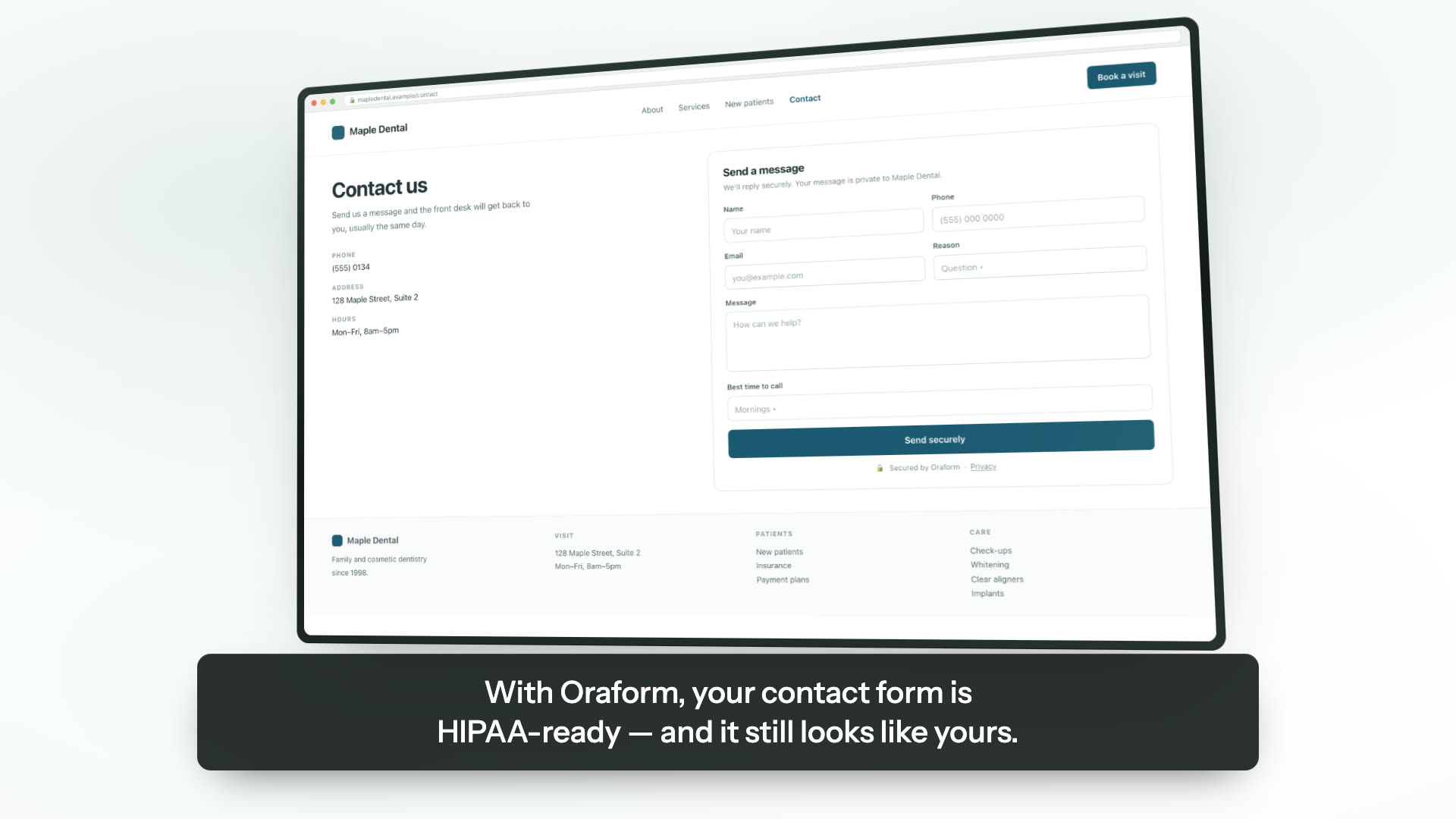
Example — on Maple Dental’s own contact page
- It sits on your page, in your brandingYour colours, your logo and your wording, on the contact page you already have.
- The patient writes to youTheir name, the best number to reach them on, and what they are getting in touch about.
- You read it behind your loginThe same place your intake forms arrive, with every view and export written to the audit log.
Your staff are told an enquiry has arrived. What the patient wrote stays in Oraform.
Your website’s form was built for enquiries, not for patients
The contact form on a practice website is almost always whatever came with the website. It was built to pass on a question about a price or an opening time, so it does what a website form does: it mails the message to whoever is on the notification list, keeps a copy in whatever tool the site was built with, and sits on a page carrying the same analytics and advertising scripts as every other page.
Patients do not read it that way. Asked “how can we help?”, a fair number of them answer with the thing that is actually wrong — a symptom, a medication, a diagnosis they already have. Nobody asked them for it and there it is, in a mailbox, in a website tool, on a page with a tracking script on it.
What that means for your practice is not something we can tell you, and this is not the page to find out: it depends on facts we do not have, and your compliance adviser is the one to ask. What we can do is take the form itself off the list of things you have to think about.
What you get
Your branding, your page
Your colours and your logo, on the contact page you already have. The patient does not leave your website, and nothing on the form carries our name.
One line of code
Paste it where your contact form is now — a block on WordPress, Squarespace, Wix or Webflow. There is nothing to host and nothing to keep updated afterwards.
Enquiries where your forms already are
An enquiry arrives in the same inbox as your intake forms, behind the same login, listed the same way. One place to look rather than two.
Inside the same agreement
The same hosting, the same encryption, the same per-practice isolation and the same audit trail as every other form Oraform builds for you. The BAA you already have covers it.
Nothing watching the patient
No advertising or analytics scripts on the form itself. That has been the rule on Oraform’s patient forms from the start and a form on your public website does not get an exception.
We build it for you
Send us the form you have now and we rebuild it free, the same way we rebuild your intake forms. You see it working before it goes anywhere near your website.
What “HIPAA-ready” means here
The same thing it means everywhere else on this site, and it is worth being plain about which half is ours. Oraform’s half is the hosting, the handling and the agreement; your half is how your practice uses it, and no software can sign for that.
- The form posts to Oraform. It does not go through your website’s host, its mailer or its database.
- Encrypted in transit and at rest, with a separate key per practice.
- Each practice’s data walled off at the database level.
- Every view and every export written to the audit log.
- No advertising or analytics scripts on the form.
- We sign a business associate agreement before any patient data is collected.
What none of that settles is what your own obligations are, which depends on your practice rather than on our software. Ask your compliance adviser. How we protect patient data
Questions about contact forms
Is this the same thing as our intake forms?
The same engine, a different job. An intake form goes to a patient you are expecting, by link or a QR code at the front desk, and asks everything. A contact form sits on your public website, anyone can fill it in, and it asks for very little — a name, a number and what they are getting in touch about. Both arrive in the same place.
Does the patient leave our website?
No. The form renders on your own contact page in your own branding. There is no redirect to us, and nothing on it carries our name.
How do we put it on our site?
One line of code on the page where your contact form is now — a block to paste in on WordPress, Squarespace, Wix or Webflow, and nothing to maintain afterwards. If you would rather not touch the site, put us in touch with whoever looks after it and we will do it.
Where do the enquiries go?
Into Oraform, behind your login, listed alongside your patient forms. Your staff get a notification that an enquiry has arrived; what the patient actually wrote stays in Oraform rather than being mailed around the practice. That is the same rule the review requests follow — nothing about a patient travels in a message that does not need to.
Is it HIPAA-ready?
It runs inside the same agreement as the rest of Oraform, on the same hosting, encrypted in transit and at rest, with every view and export logged, and we sign a BAA before any patient data is collected. What your own obligations are depends on facts we do not have, and that is a question for your compliance adviser rather than for a page like this one.
Can we keep the form we have as well?
You can, and some practices run both for a few weeks while they change over. Two forms collecting the same enquiries means two places your front desk has to remember to look, so it is worth picking a date to switch the old one off.
More from Oraform
Get a free sample of your form.
Send us the forms you hand patients today and we'll turn them into working Oraform samples — your logo on them, finished on a phone or a computer. We rebuild all of your forms free, and free setup comes with it. No cost, no commitment, nothing to cancel.
We'll send your sample within one business day, with your logo on it — a link you can open on a phone or a computer and hand straight to a patient.
Nothing to do in the meantime. If you'd rather talk it through, email forms@oraform.health or call (312) 635-5523.