
Turn your patient intake into your best marketing tool.
Oraform gives your patients an exceptional intake experience, then turns it into more Google reviews and more booked services.
We build them for you. Same questions, same wording, live in about a week. Nothing for your staff to learn.
Every form your patients fill in.
We rebuild what you hand out today, and the form on your website too — all of it HIPAA-ready, all of it in your branding.
History, consents and insurance — finished on the patient’s phone before they arrive.
What’s includedPHQ-9, GAD-7 and your own questionnaires, scored on submission with severity bands.
See the templatesReplace your website’s contact form with a HIPAA-ready one, in your own branding. One line of code.
Watch the 1-minute videoIf your patients fill it in before a visit, we can build it. Send us the sheet and see it back.
What we can buildHow Oraform grows your practice
Your clipboard asks every patient the same thirty questions and then files the answers in a drawer. Oraform asks them on the patient’s phone, in your branding — and turns what they said into reviews and booked appointments.
A diagram in three parts. On the left, a practice’s paper patient-information form — name, date of birth, address, insurance, best number to contact you, reason for visit. In the middle, the same questions as an Oraform form on a patient’s phone, in the practice’s own colours, with the name and date of birth already filled in from a scan of the patient’s ID. On the right, the two things that follow the visit: a message asking the patient for a Google review, and an email following up on a service they said they were interested in.
- Patients fill your form
- A review request goes out
- They book again
One system, three ways to grow.
All three run off the intake your patients were filling in anyway.
Smoother intake
Your own forms on the patient’s phone, in your branding — filled in before they arrive, with nothing for your staff to retype.
What’s includedMore reviews
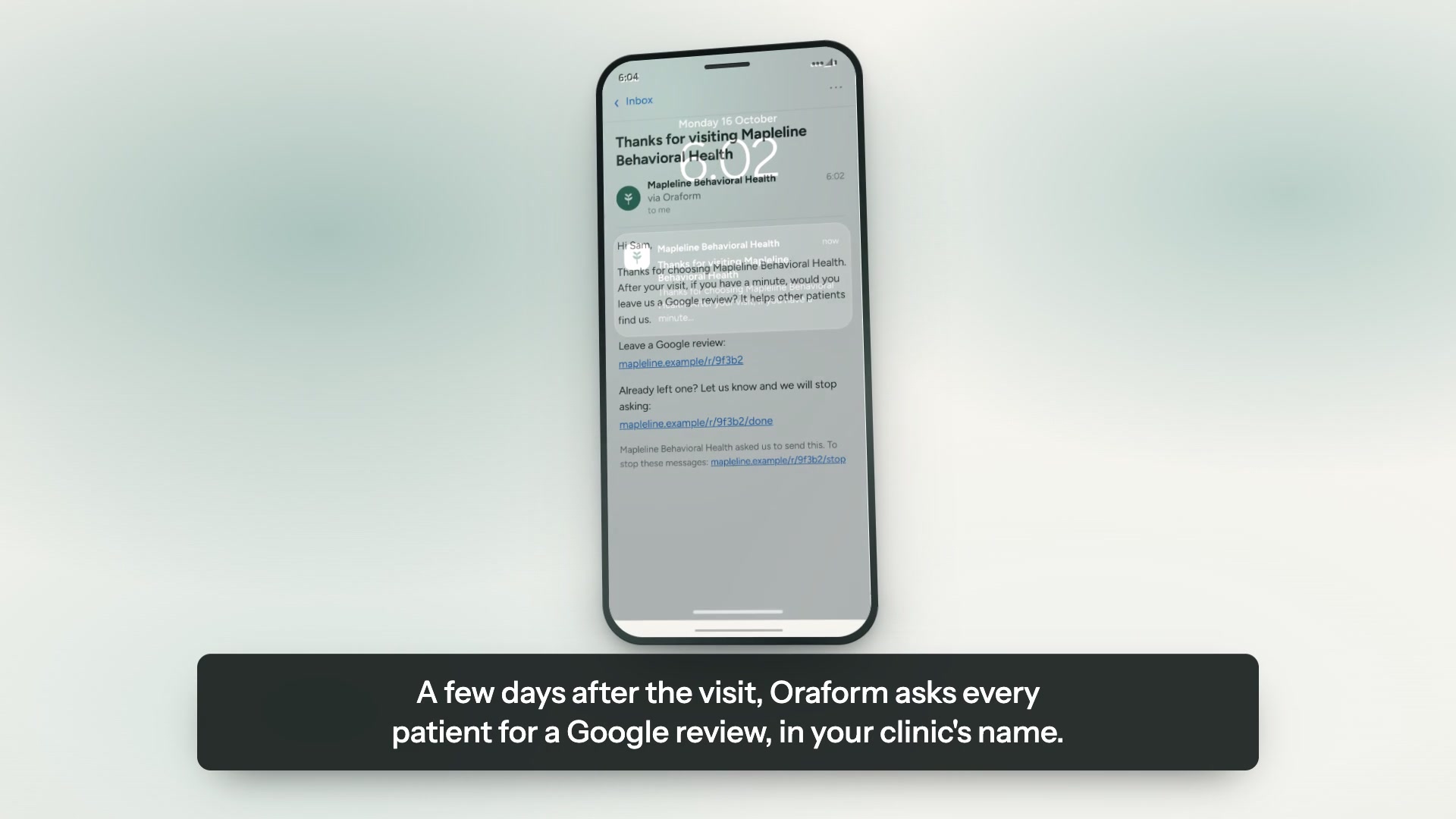
A few days after the visit, every patient is asked for a Google review in one short message, in your branding.
How it worksMore appointments
Patients say at intake which services interest them, and we follow up about those only — one tap to request a time.
How it worksMore Google reviews, without asking in person
Unlike general form builders, Oraform keeps going after the form is sent. Asking for a review face to face is the part nobody enjoys; this does it for you, a few days later, in one short message.
Third-party research — not our figures
won’t book with a provider rated below 4.0 stars
rater8, 2026 Patient Choice Report (over 1,000 US adults)
have avoided or canceled an appointment because of online reviews
rater8, 2026 Patient Choice Report (over 1,000 US adults)
Oraform asks every patient for a Google review after their visit, so your rating reflects all your patients, not just the unhappy few.
- The patient finishes your forms
On their phone, before they come in. There is nothing extra for them to fill in and nothing to opt into.
- A few days later we send one short message, in your branding
You choose the gap — two days, three, five or a week. If they filled the forms at the front desk, it goes that evening.
- One tap opens your Google review page
Or they tap “I’ve already left a review” and we stop. Nothing about the treatment or their answers is in the message.
Example message
Thanks for choosing Maple Dental
After your visit, would you leave us a Google review?
The rules we follow
- One message, and at most one gentle reminder. Then nothing more.
- The same message to every patient — no asking people to rate you privately first.
- Nothing about the treatment, the diagnosis or the answers is in the message.
- Off until you switch it on, and one-click unsubscribe for the patient.
Three steps, about a week.
You send what you use today. We do the rest.
Send us your forms
A PDF, a Word file, a link, or a photograph of the sheet on your desk. Whatever you have is enough to start.
We rebuild them, free
Same questions, same wording, in your colours and your logo. You review it before a patient ever sees it.
Patients finish on a phone
A link or a QR code at the front desk. No app, no account, progress saved as they go.
Some of the front desks that left the clipboard behind
Hair restoration, weight care and physical medicine.



Two plans. Free setup on both.
Starter fills your Google reviews. Growth fills your appointment book. Per practice location, no contract on monthly.
Per practice location.
- Forms built for you — free setup
- Phone-first patient forms, ID scan, e-signature
- Google review requests after every visit
- HIPAA-ready hosting with a BAA
Per practice location.
- Patient referrals, with who referred whom
- Service follow-ups to patients who opt in
- One-tap appointment requests, front-desk alerts
- Patient insights
Already on Starter? Try Growth free for 60 days. If it doesn’t work for you, you go back to Starter automatically.
Free setup on both — we rebuild the forms you use today. Billing starts when your forms go live. Extra locations are +$79/mo. Compare plans →
HIPAA-ready, with a BAA for every practice.
We sign a business associate agreement with you before any patient data is collected.
Encrypted in transit and at rest, hosted on Google Cloud. Security details →
Get a free sample of your form.
Send us the forms you hand patients today and we'll turn them into working Oraform samples — your logo on them, finished on a phone or a computer. We rebuild all of your forms free, and free setup comes with it. No cost, no commitment, nothing to cancel.
We'll send your sample within one business day, with your logo on it — a link you can open on a phone or a computer and hand straight to a patient.
Nothing to do in the meantime. If you'd rather talk it through, email forms@oraform.health or call (312) 635-5523.